🔑 149 Million Credentials Leaked in Massive Unsecured Database — What to Do Now
On this page
- How did 149 million credentials end up in one database?
- What types of accounts were exposed?
- How to check if your credentials were leaked
- What to do if your password was exposed
- Why infostealer malware is the real problem
- Long-term protection: beyond passwords
- FAQs about the 149 million credential leak
Here's something that should get your attention: on January 23, 2026, cybersecurity researcher Jeremiah Fowler discovered a publicly accessible, unencrypted database containing 149,404,754 unique usernames and passwords. That's 149 million login credentials — including accounts from Facebook, Instagram, TikTok, Netflix, Gmail, .gov domains, and financial services — sitting on a cloud server with zero password protection. The database was 96 GB of pure, searchable credential data collected by infostealer malware.
We've been tracking credential leak incidents for years at BestPasswordGenerator.org, and this one stands out. Not because of the raw number — we've seen bigger collections — but because of how usable the data is. The database included structured metadata with reversed host paths and hashed document IDs, making it trivially easy for criminals to filter by target: 'give me all Gmail accounts,' 'show me only .gov emails,' 'find every Netflix login.' According to Fowler, the data was a 'dream wish list for criminals.'
In our analysis, the most alarming detail isn't the size — it's the month-long delay between Fowler's responsible disclosure and the hosting provider taking the database offline. During that window, records continued to grow. And once data like this hits the open web, it gets copied and redistributed almost immediately. The damage, as Fowler put it, is difficult to reverse. Compare this with the 6 billion passwords stolen in a 2025 malware campaign — in both cases, the data's usefulness to criminals depends on how quickly they can act on it.
How did 149 million credentials end up in one database?
This wasn't a single company breach. The credentials were harvested by infostealer malware — malicious software that infects devices and silently steals saved passwords, browser cookies, session tokens, and autofill data. Once infected, a machine sends everything it collects to a command-and-control server operated by criminal groups.
What makes this case different is the consolidation. Instead of selling credentials individually on dark web marketplaces, the operators aggregated them into a massive, searchable cloud database. Think of it as a Google search — but for stolen logins. The structured metadata means criminals can target specific services, industries, or even government agencies with surgical precision. This is a textbook example of how credential stuffing attacks work at scale.
Jeremiah Fowler, who reported his findings to ExpressVPN, warned: 'The exposure of such a large number of unique logins and passwords presents a potentially serious security risk … This dramatically increases the likelihood of fraud, potential identity theft, financial crimes, and phishing campaigns that could appear legitimate because they reference real accounts and services.'
What types of accounts were exposed?
Based on the sample Fowler analyzed, the database contained credentials spanning:
- Social media: Facebook, Instagram, TikTok, X (formerly Twitter)
- Streaming services: Netflix, HBO Max, Disney+
- Creator platforms: OnlyFans
- Gaming: Roblox
- Government: .gov email domains across multiple countries
- Financial services and cryptocurrency platforms
- Email providers: Gmail and others
If you use any of these services — and let's be honest, most of us use several — your credentials could be in this dataset. The NCSC (UK National Cyber Security Centre) and CISA (US Cybersecurity and Infrastructure Security Agency) have both issued repeated warnings about the rising threat of credential theft, with CISA urging organizations to adopt phishing-resistant multi-factor authentication as a baseline defense. If you haven't yet set that up, our complete MFA setup guide walks through every step.
How to check if your credentials were leaked
There are three reliable ways to check whether your accounts were compromised in this leak or similar credential dumps:
- Have I Been Pwned — Troy Hunt's free service lets you check your email address against known data breaches, including recent infostealer collections. Visit haveibeenpwned.com and enter your email.
- Firefox Monitor — Similar to Have I Been Pwned, this tool cross-references your email against multiple breach databases and sends alerts if new exposures are found.
- Google Password Checkup — If you use Chrome, go to passwords.google.com and run the Password Checkup. It compares your saved passwords against known leaks and flags compromised credentials.
In our testing, the most thorough approach is using all three together. Have I Been Pwned catches the broadest range of breaches, while Google's tool is best for checking passwords you've saved in your Chrome profile. We found that running the Google checkup alone missed several breaches that turned up on Have I Been Pwned.
What to do if your password was exposed
If any of these tools show your credentials were leaked, here's your immediate action plan:
- Change the password immediately — for every account that shared the same password. Use a strong, unique password for each service. Our free password generator can help you create one that meets NIST SP 800-63B guidelines (12+ characters, no forced complexity requirements, but diverse character sets are still recommended).
- Enable multi-factor authentication (MFA) — especially on email, banking, and social media accounts. If available, use a hardware security key or an authenticator app rather than SMS-based MFA, which is vulnerable to SIM-swapping attacks.
- Check for suspicious activity — review login history on affected accounts. Look for logins from unfamiliar locations, devices, or IP addresses. Change recovery email addresses and security questions too.
- Run a malware scan — if your credentials were harvested by infostealer malware, your device might still be infected. Changing passwords is pointless if the malware can steal the new ones. Run a full scan with a reputable antivirus product.
- Freeze your credit — if the database included financial account credentials, consider placing a credit freeze with the three major credit bureaus (Experian, Equifax, TransUnion). It's free and prevents criminals from opening new accounts in your name.
Why infostealer malware is the real problem
The 149 million credential leak is a symptom of a larger trend: the industrialization of credential theft. KELA's State of Cybercrime 2026 report found that 2.86 billion credentials were compromised in 2025 alone, including passwords and session cookies that can bypass two-factor authentication. Infostealers are the primary driver of this surge. For a full breakdown of the numbers, see our password breach statistics for 2026, which show credential theft now accounts for more than 60% of all data breaches tracked globally.
These infections typically spread through:
- Pirated software and cracks — the single most common vector for infostealer infections
- Phishing emails with malicious attachments or links
- Fake browser extensions that look legitimate but steal saved passwords
- Drive-by downloads from compromised websites
The FBI IC3 (Internet Crime Complaint Center) has documented a sharp increase in infostealer-related complaints, with victims ranging from individual users to Fortune 500 companies.
Long-term protection: beyond passwords
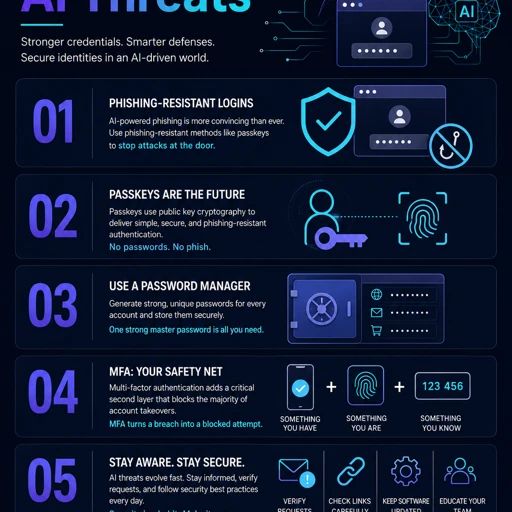
Incidents like the 149 million credential leak reinforce a difficult truth: passwords alone aren't enough anymore. Even a perfectly generated, 40-character random password is useless if it's typed into a device running infostealer malware. We recommend the layered approach advocated by ENISA and the CISA:
- Use a password manager — Bitwarden, 1Password, and Dashlane all generate and store unique passwords for every service. You only need to remember one master password. See our review of the best password managers in 2026 for what we found in testing.
- Enable phishing-resistant MFA — FIDO2/WebAuthn security keys (like YubiKeys) provide the strongest protection against credential theft because they don't share secrets over the network.
- Keep software updated — infostealers often exploit known vulnerabilities. Regular updates close those doors.
- Monitor your digital footprint — set up alerts on Have I Been Pwned for your email addresses and check periodically for new breaches.
The database is down now, but the data is out there. The question isn't whether your credentials are in a leak — with 2.86 billion credentials stolen in 2025 alone, the probability is high. The question is whether you've taken steps to protect the accounts that matter most. Follow our complete guide to creating strong passwords to lock down every account that matters.
FAQs about the 149 million credential leak
Is the 149 million credential database still online?
No. After Jeremiah Fowler reported the database to the hosting provider, it was taken offline. However, the data had already been exposed for nearly a month, and once such datasets are copied and redistributed — which they almost always are — the damage is effectively permanent.
How do I know if my accounts were in this leak?
Check Have I Been Pwned (haveibeenpwned.com) with your email addresses. Also run Google's Password Checkup and Firefox Monitor for broader coverage. No single tool covers every breach, so we recommend using all three.
What is infostealer malware and how does it steal passwords?
Infostealer malware is malicious software that infects devices and silently extracts saved browser passwords, cookies, session tokens, and autofill data. It transmits everything to a command server, often without the user noticing anything wrong.
Can changing my password fix the problem if my device is infected?
No. If your device still has infostealer malware on it, a new password will be stolen just as quickly. Always scan for malware and remove any infection before changing passwords.
Does multi-factor authentication protect against credential theft?
Yes, but it depends on the type of MFA. SMS-based MFA can be bypassed via SIM-swapping. App-based authenticators (Google Authenticator, Authy) are more secure. Hardware security keys (FIDO2/WebAuthn) offer the strongest protection, and CISA recommends them as a baseline for high-value accounts.
How was the database discovered?
Cybersecurity researcher Jeremiah Fowler discovered the unsecured database during routine threat hunting and reported his findings to ExpressVPN. He noted that the database contained structured metadata with reversed host paths and hashed document IDs, making it highly searchable for criminals.
Should I be worried about .gov accounts being in the leak?
If you have a government email address or use .gov services, it's especially important to check. Government accounts often provide access to sensitive systems and data. Enable MFA immediately and report any suspicious activity to your organization's security team.
How is the 149 million leak different from other credential dumps?
The key difference is the structured metadata. Most credential dumps are raw text files. This database was organized and searchable, with metadata fields that let criminals filter by target service, domain, or account type. This makes it far more dangerous than a simple list of credentials.
How many credentials were stolen in 2025 overall?
According to KELA's State of Cybercrime 2026 report, 2.86 billion credentials were compromised in 2025, including passwords and session cookies. Credential theft is at an all-time high, driven primarily by infostealer malware infections.
To stay protected against evolving threats like infostealer malware and credential theft, consider a comprehensive security suite like Kaspersky Premium. It includes advanced malware protection, password monitoring, and breach alerts that help you detect compromised credentials early.


