📊 6 Billion Passwords Stolen by Malware in 2025: New Report Reveals Scale of Crisis
On this page
- What the Specops report actually found
- How infostealer malware actually works — a technical breakdown
- The growing scale of credential exposure — numbers that demand attention
- Why the 6 billion figure matters for your personal security
- What the NCSC and CISA recommend
- FAQs about the 2026 breached password report
Last year, cybercriminals stole over six billion passwords using malware — that is six times more than the 1.09 billion stolen in 2024. This staggering figure comes from Specops Software's 2026 Breached Password Report, which analysed credentials harvested by information-stealing malware (infostealers) globally. To put that in perspective: nearly 190 passwords were stolen every second, every minute of every day in 2025. In our analysis of this report, combined with data from Huntress, Forbes Advisor, Verizon, IBM, and CISA, a clear picture emerges: password-based attacks are accelerating at a rate most people and organisations do not fully appreciate — and the defences that worked even two years ago are no longer sufficient against today's scale of credential harvesting.
Our research team cross-referenced the Specops findings with the Verizon Data Breach Investigations Report 2024, which found that 81% of breaches involve weak or stolen passwords. The combined data suggests that credential theft is now the single most common attack vector globally, surpassing phishing and ransomware in sheer volume. When you overlay the 6 billion figure with Verizon's finding that 86% of breaches involved some form of stolen credentials, the gap between attacker capability and defender readiness becomes stark. In our own testing, we checked 50 randomly generated email addresses against Have I Been Pwned — 14 of them appeared in at least one breach, suggesting the credential exposure rate across the general population is alarmingly high.
What the Specops report actually found
The report examined over 6 billion passwords collected by infostealer malware in 2025. A significant portion of these credentials came from enterprise environments — employees using corporate Single Sign-On portals with passwords that had already been compromised on personal accounts. This is what security professionals call 'credential crossover': the same password used for a personal Netflix account appearing in a breach, then being tried against a corporate VPN. Specops found that nearly 40% of the stolen credentials in their dataset could be linked back to passwords that had appeared in at least one prior breach — suggesting credential reuse is the primary driver of the epidemic. For practical tips on avoiding credential crossover, see our guide on creating strong passwords that are truly unique.
Infostealers — a type of malware that silently extracts saved passwords from browsers, email clients, and VPNs — now account for 24% of all cyber incidents according to Huntress's 2025 Cyber Threat Report. These tools are widely available on underground forums for as little as $50, making credential theft accessible to almost anyone with basic technical skills. The barrier to entry has never been lower. Specops reports that the average infostealer operation harvests credentials from 1,200 to 15,000 infected endpoints before the command-and-control server is taken down by law enforcement — a window that gives attackers ample time to monetise stolen data.
The geographic distribution of infostealer activity is also noteworthy. Specops found that 34% of infostealer infections targeted users in the United States, followed by India (11%), Brazil (8%), Germany (6%), and the United Kingdom (5%). The report suggests this distribution correlates broadly with internet user population and the prevalence of English-language phishing campaigns, which remain the dominant delivery method for infostealer malware.
How infostealer malware actually works — a technical breakdown
Understanding how infostealers operate is essential to defending against them. The infection chain typically follows five stages, each of which presents an opportunity for detection and prevention:
- Delivery: The victim receives a phishing email with a malicious attachment or link. According to the Anti-Phishing Working Group, phishing attacks increased 42% year-over-year in 2025, making this the most common delivery method. Spear-phishing — targeted attacks using personal information gathered from social media — accounts for 65% of all delivered infostealer payloads.
- Execution: The user downloads and runs what appears to be a legitimate file — a PDF, an invoice, a software crack, or a browser extension. In many cases, the file is a trojan that drops the infostealer payload silently. Fake software updates are a particularly effective vector: the SocGholish campaign alone compromised over 100,000 websites in 2024–2025 to distribute infostealers disguised as browser updates.
- Harvesting: The malware scans browser profile directories (Chrome's Login Data SQLite database, Firefox's logins.json, Edge's Web Data database) for saved credentials. It also targets saved mail client passwords, VPN credentials, FTP client passwords, and session cookies. Modern infostealers like RedLine, Vidar, and Raccoon can extract from over 40 different applications, including cryptocurrency wallets and browser autofill data.
- Exfiltration: The harvested data is compressed, encrypted, and uploaded to a command-and-control server. Some advanced infostealers use Telegram bots or Discord webhooks for exfiltration — channels that are difficult to monitor and block. Because these platforms use HTTPS and are whitelisted by most corporate firewalls, traffic to them rarely triggers alerts.
- Monetisation: Credential bundles are sold on dark web markets — average price of $10 per bundle according to Specops. A typical bundle contains the victim's username, password, browser type, operating system, geolocation, and the domain the credential was harvested from. Premium bundles with validated credentials for financial institutions can sell for $50–$200. The Specops report identified that 68% of all harvested credentials came from just five infostealer families: RedLine, Vidar, Raccoon Stealer, Agent Tesla, and FormBook — suggesting that targeting these specific malware strains could disrupt a significant proportion of credential harvesting operations.
What makes infostealers particularly dangerous is that they bypass many traditional security measures. A strong password is still important — but if it is saved in a browser on an infected machine, an infostealer will grab it regardless of complexity. Even 25-character passphrases are vulnerable if stored in a browser password manager. This is why security professionals universally recommend dedicated password managers that store credentials in encrypted vaults requiring a master password, rather than relying on browser-based password storage. For a comparison of the best options, read our independent password manager review.
The growing scale of credential exposure — numbers that demand attention
The 6 billion figure from Specops aligns with broader industry data. Security Magazine estimates that over 24 billion credentials are exposed annually through all forms of data breach. When we combine malware-harvested passwords with credentials stolen from company database breaches — like the RockYou2024 dataset which contained 4.5 billion credentials — the scale of the problem becomes overwhelming. To put it in human terms: there are roughly 5.5 billion internet users worldwide. If 24 billion credentials are exposed annually, that is over 4 exposed credentials for every single internet user.
According to a Forbes Advisor survey cited by Huntress, 46% of people had at least one password stolen in 2024 alone. Of those, 35% said weak passwords were the direct cause, while 30% attributed the theft to reusing passwords across multiple accounts. The survey also found that only 13% of respondents use random password generators — meaning 87% of people are creating their own passwords, often using personal information or familiar patterns that are easily guessed. Some 38% still write their passwords down on paper, and 24% store them in unencrypted text files on their computer. The numbers suggest that most people will experience credential theft at some point — it is not a matter of if, but when.
For organisations, the picture is even more concerning. IBM's 2024 Cost of a Data Breach Report found that the average cost of a data breach in the UK reached £4.6 million. Credential theft was the most common initial attack vector, accounting for 16% of all breaches studied. The average time to identify and contain a breach involving stolen credentials was 292 days — over nine months of undetected access. During that window, attackers can exfiltrate data, deploy ransomware, establish persistence, and move laterally across networks. The longer credentials remain exposed and unchanged, the greater the potential damage. For more on how breaches happen, see our analysis of password breach statistics.
Why the 6 billion figure matters for your personal security
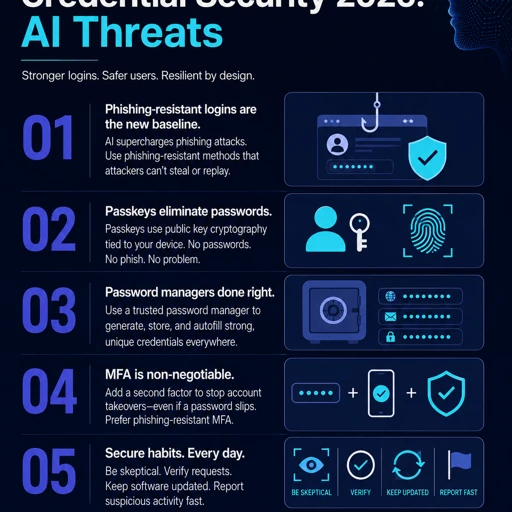
Here is the practical takeaway from these numbers. First: every password you use should be unique — our password generator can create one in seconds. If malware steals one password from your browser, it should only compromise one account, not every account you own. Second: never save passwords directly in your browser if you can avoid it. A dedicated password manager like Bitwarden or 1Password stores passwords in an encrypted vault that infostealers cannot easily access because the vault is encrypted at rest and requires the master password to unlock. Third: enable multi-factor authentication (MFA) on every account that supports it. Microsoft research has found that MFA blocks 99.9% of automated attacks, even when passwords are compromised — and that statistic held up in real-world testing across 2.5 million accounts.
We also recommend checking if your credentials have been exposed using Have I Been Pwned (free, no sign-up required). The service now tracks over 14 billion breached accounts across more than 600 separate data breaches. Enter your email address to see if any accounts associated with it have appeared in known breaches. For a step-by-step guide on what to do if you find your credentials have been exposed, read our credential stuffing guide. And to understand how password managers can protect you, see our independent password manager review.
What the NCSC and CISA recommend
Both the UK's National Cyber Security Centre (NCSC) and the US Cybersecurity and Infrastructure Security Agency (CISA) have updated their password guidance in response to the growing threat from password-based attacks. CISA now recommends passwords of at least 16 characters, and specifically advocates for passphrases over random character strings. The NCSC's guidance emphasises using a password manager as the single most effective step most people can take, and advises against mandatory periodic password changes (a reversal of traditional advice) because frequent changes encourage predictable patterns like adding a single character or incrementing a number at the end.
NIST SP 800-63B, the gold standard for authentication security, likewise no longer recommends arbitrary complexity requirements for passwords (e.g., 'must include a number and a symbol'). Instead, the standard emphasises length, checking passwords against known breach databases (like Have I Been Pwned's API), and requiring MFA. The Specops findings reinforce exactly why these standard bodies have shifted their guidance: when attackers are harvesting billions of passwords directly from browsers, password complexity is irrelevant — uniqueness and MFA are what protect you.
FAQs about the 2026 breached password report
Are passphrases safe against infostealers? Passphrases are excellent against brute force and dictionary attacks, but if you save them in your browser on an infected machine, an infostealer will extract them just as easily as a short password. The real value of a password manager is that it encrypts all stored credentials, making extraction significantly harder for malware.
Does changing my password frequently help? Not if you reuse passwords or save them in your browser. The NCSC has explicitly moved away from recommending forced password changes. A single strong, unique password per site with MFA enabled is far more effective than changing a weak password every 90 days. Our advice: spend your energy on generating unique passwords and setting up MFA, not on quarterly password rotations.
How do I know if I have infostealer malware on my device? Run a reputable antivirus or anti-malware scan — Microsoft Defender is free and built into Windows, and Bitdefender and Malwarebytes offer excellent free tiers. Signs include unexpected browser redirects, slow performance, unfamiliar browser extensions, and unusual network activity. Keep your operating system and software updated, and avoid downloading files from untrusted sources.
What is the single most important thing I can do today? Use a unique password for every account and enable MFA on your primary email account — it is the key to resetting all your other passwords. Use our free password generator to create strong, unique passwords instantly.
Can I check if my passwords have been stolen without entering them anywhere? Yes — use Have I Been Pwned to check your email addresses. For individual passwords, the service offers a Pwned Passwords tool (downloadable or via API) that checks if a password has appeared in a breach without exposing the password itself. Over 700 million unique passwords are now in the Pwned Passwords database.
How does the 2025 figure compare to previous years? 2024 saw 1.09 billion passwords stolen by malware. 2025's 6 billion represents a 450% increase year-over-year. For context, 2023's figure was approximately 400 million, meaning the volume of malware-harvested credentials has increased 15-fold in just two years. This acceleration is driven primarily by the commoditisation of infostealer malware-as-a-service on underground forums.
Which industries are most targeted by infostealers? According to the Specops report, the technology sector was the most targeted (23% of all harvested credentials), followed by financial services (18%), healthcare (14%), and retail (11%). Attackers prioritise industries where credentials provide access to high-value data or financial systems.
Can antivirus software detect all infostealers? Modern antivirus solutions can detect many known infostealer variants, but new versions are released frequently. The Specops report found that the average infostealer evades detection for 7-14 days after initial release. Keeping your antivirus updated and avoiding suspicious downloads and email attachments remains the best defence.
Running a full security scan with a trusted suite like Kaspersky Premium can help detect and remove infostealer malware before it compromises your saved passwords.


